
- March 28, 2026
SEO Guide for Beginners: Rank #1 on Google

Every day, 8.5 billion searches happen on Google — and the top three results capture more than 60% of all the clicks. That means if your website is not near the top, almost no one will ever find it, no matter how good it is. Most websites are not failing because they are bad. They are failing because they were never built to be found. That is exactly the problem SEO solves.
Search Engine Optimization is the process of making your website visible to the right people, at the right moment, for free — no ads required. This SEO guide for beginners walks you through everything: how Google works, what actually influences rankings, and the exact steps you can take today to start climbing search results. No technical background needed. No big budget required. Just a clear, proven path to getting your website seen.
In this guide
1. What is SEO?
2. Paid search vs. organic search — differences and similarities
3. Why seo is important for a website?
4. How do search engines work?
5. What are the four pillars of SEO?
6. On-page SEO — the complete breakdown
7. Technical SEO — what it is and why it matters
8. Off-page SEO and link building
9. Local SEO — how to rank in your city
10. SEO tools every beginner needs
1. What is SEO? (Search Engine Optimization)
SEO (Search Engine Optimization) is the process of improving a website so it ranks higher in search engine results pages (SERPs) — primarily Google — without paying for ads. It involves optimizing your content, technical setup, and online authority so Google understands your site and shows it to the right people at the right time.
Think of it this way: when someone types a question into Google, millions of pages compete for that answer. SEO is how you make sure your page wins that competition.
Example: Imagine you sell handmade candles. A potential customer types ‘best handmade soy candles online’ into Google. If your page is optimised for that phrase, Google can show your website at the top. If not, your competitors get that customer for free. That is the power of SEO.
SEO vs Paid Ads — What Is the Difference?
|
Factor
|
SEO (Organic)
|
Paid Ads (PPC)
|
|---|---|---|
|
Cost
|
Free to rank
|
Pay per click
|
|
Time to results
|
3–6 months
|
Immediate
|
|
Long-term value
|
Builds over time
|
Stops when budget ends
|
|
Trust level
|
Users trust organic more
|
Marked as 'Ad'
|
|
Sustainability
|
High — compounding returns
|
Low — needs constant spend
|
Why SEO Is Important for Your Website
SEO is no longer optional. It is one of the highest-ROI marketing channels available to any website owner — here is why:
1. Organic Search Drives the Majority of Web Traffic
According to BrightEdge research, organic search drives 53% of all website traffic — more than any other channel, including paid ads, social media, or direct visits. If you are not investing in SEO, you are ignoring the single biggest source of traffic on the internet.
2. SEO Builds Long-Term Business Value
A paid ad stops working the moment you stop paying. An SEO-optimized page can rank for years, bringing you free traffic month after month. Think of SEO as buying real estate — it takes time to build, but the asset keeps growing in value.
3. People Trust Organic Results More
Studies consistently show that users trust organic search results far more than paid ads. When your page ranks organically at the top, it signals authority and credibility to the searcher.
4. SEO Levels the Playing Field
A small business with a strong SEO strategy can outrank a large corporation with a massive ad budget. In organic search, quality beats money — a rare opportunity in modern marketing.
5. SEO Compounds Over Time
Unlike most marketing channels, SEO becomes more powerful the longer you invest in it. More content, more backlinks, and more authority combine to produce exponentially better results over time.
2. How Do Search Engines Work?
Before you can optimize your website, you need to understand how search engines actually function. Google does not rank pages manually — it uses automated systems that follow a specific four-stage process:
Crawling → Indexing → Ranking
Stage 1: Crawling
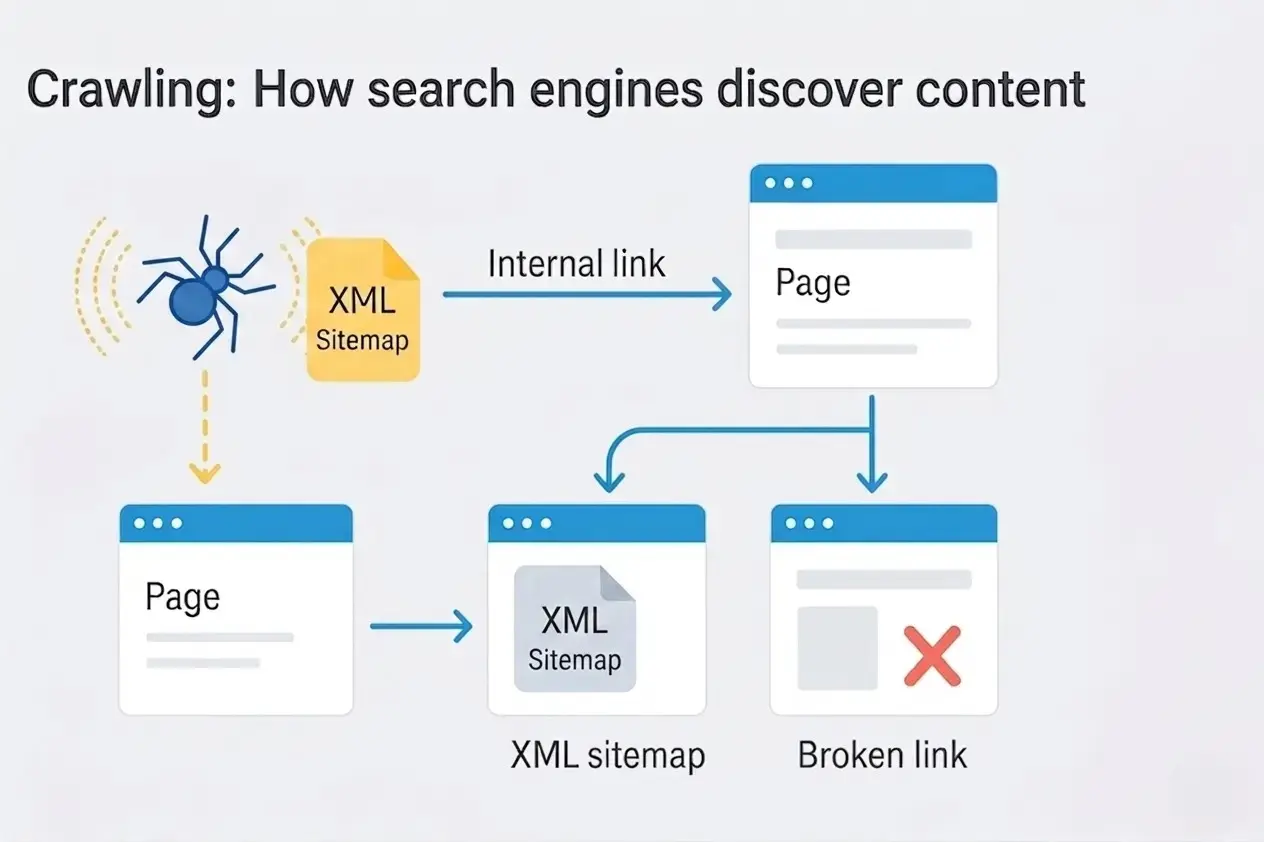
Crawling is how Google discovers and reads your website. Google sends out an automated bot called Googlebot that travels across the web by following links from one page to another. When Googlebot visits your page, it reads everything on it including your text, images, links, and code, so it can understand what the page is about. If your website has a slow server, broken links, or a misconfigured robots.txt file, Googlebot may struggle to access your content or skip it entirely. Google also works within a crawl budget, meaning it only crawls a limited number of pages on your site per day. If your site is filled with low-value or duplicate pages, your important pages may get crawled less frequently.
Stage 2: Indexing
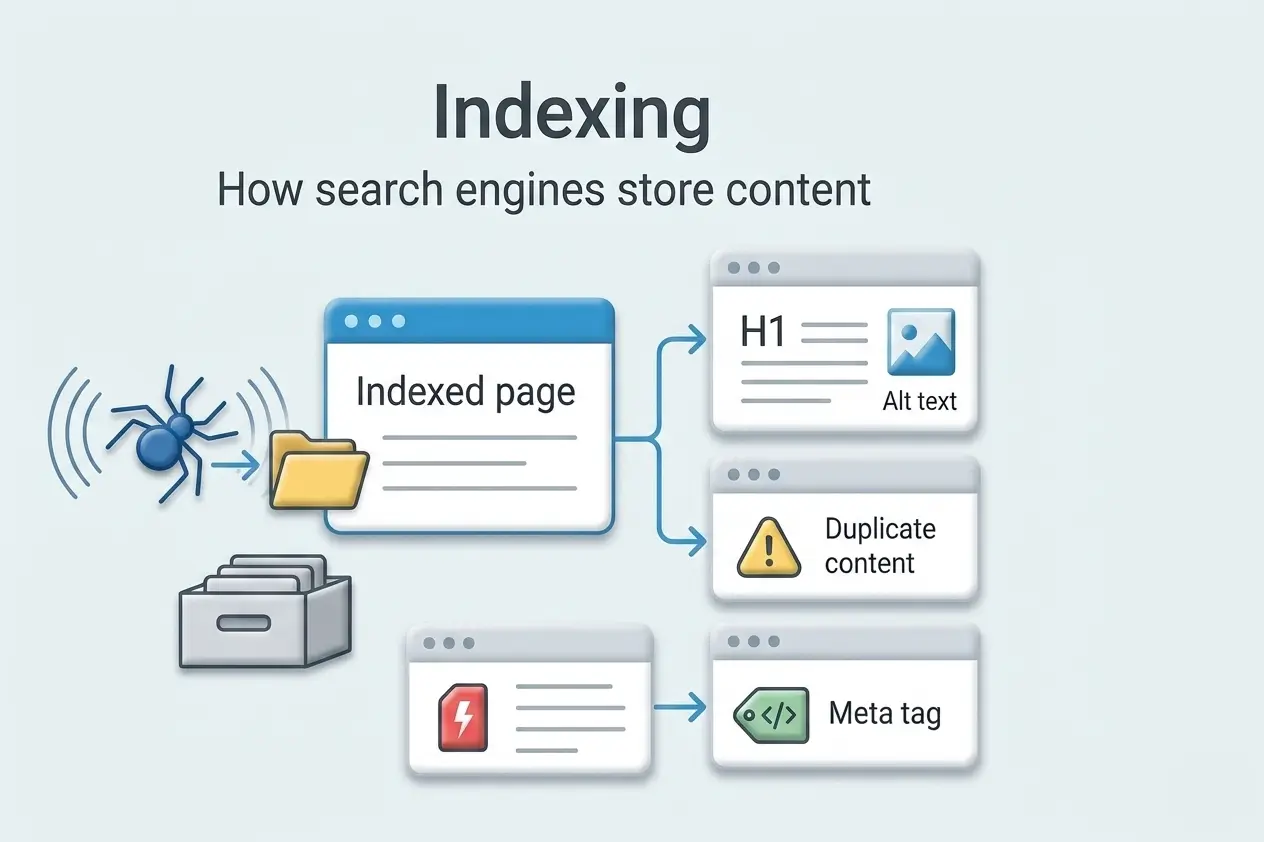
Once Google crawls a page, it decides whether to store it in its index. Think of the index as a massive library catalog containing every page Google considers worth showing in search results. Not every page that gets crawled will be indexed. Google looks for original, useful content with a proper structure and no technical errors blocking it. Pages with thin content, duplicate information, or a noindex tag are typically left out. If your page is not in the index, it simply cannot rank.
Stage 3: Ranking
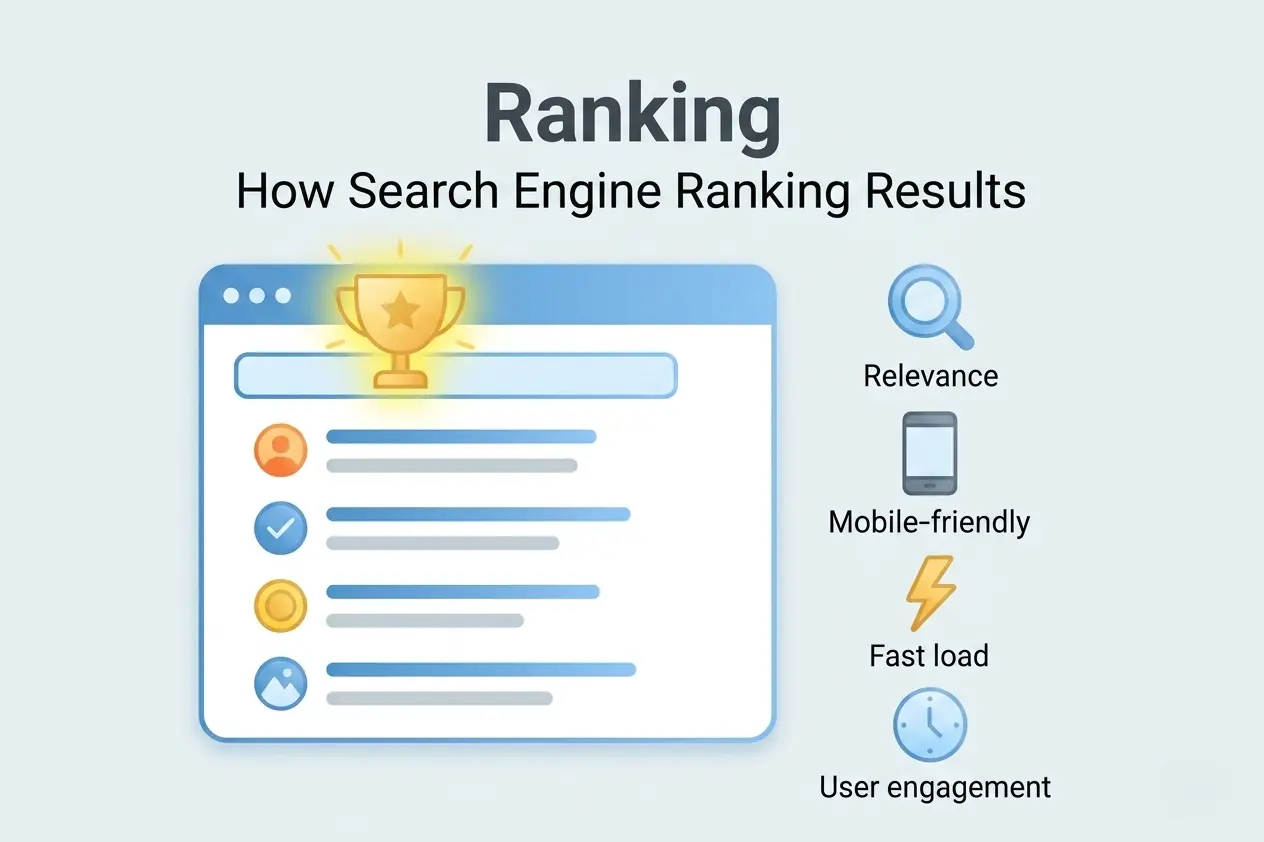
Ranking is the final stage and the one most people focus on. When someone types a query into Google, it goes through its entire index and evaluates hundreds of signals to decide which pages are the most relevant and trustworthy for that search. Factors like content quality, page speed, backlinks, and how well your page matches the search intent all play a role. The pages that best satisfy what the user is looking for earn the top spots.
3. What Are the Pillars of SEO?
- On-Page SEO
- Technical SEO
- Off-Page SEO
- Local SEO
Type 1: On-Page SEO
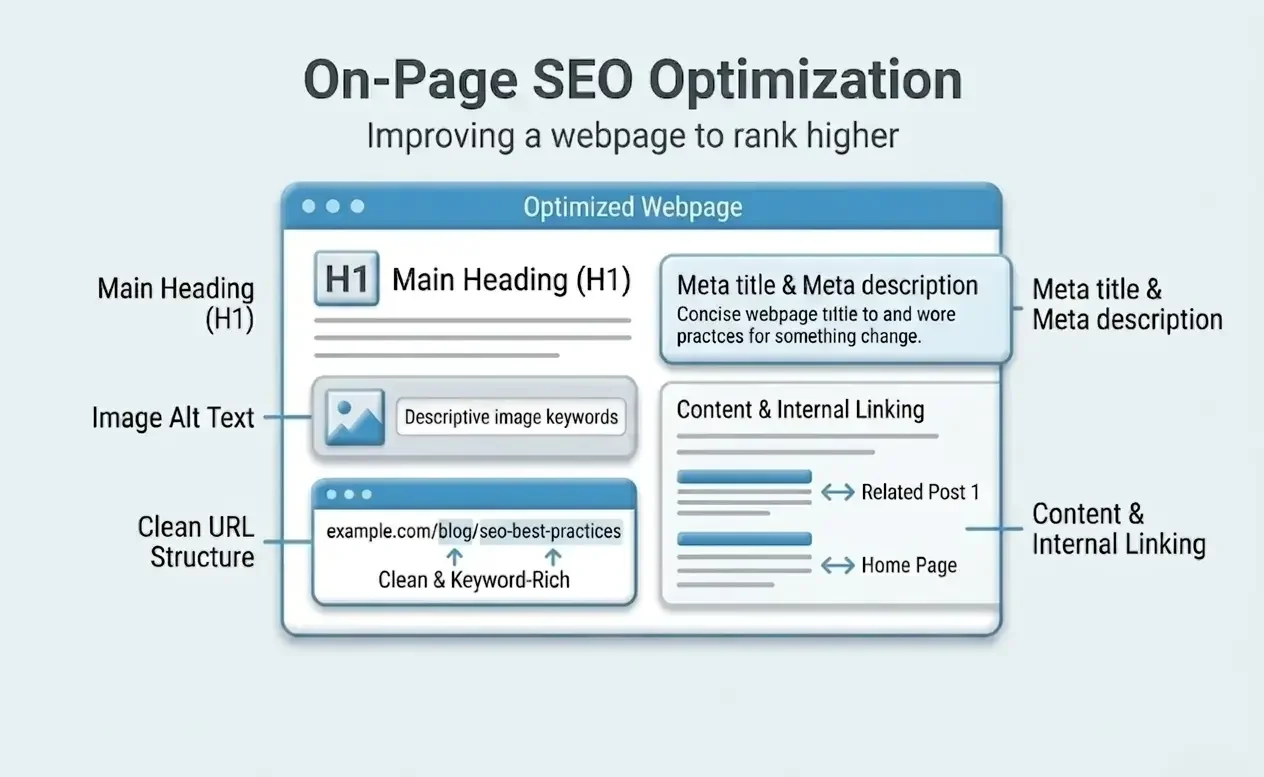
On-Page SEO covers everything you can control directly on your web pages. It is the foundation that all other SEO efforts build upon and where beginners should start.
1.1 Keyword Research — The Starting Point
You cannot optimize a page without knowing what to optimize it for. Keyword research is the process of finding the exact words and phrases your target audience types into Google.
Types of Keywords
- Short-tail keywords: 1–2 words, very high volume, very high competition (e.g., ‘SEO’)
- Long-tail keywords: 3+ words, lower volume, lower competition, higher intent (e.g., ‘SEO guide for beginners 2026’)
- Local keywords: Location-specific phrases (e.g., ‘SEO agency in Thrissur’)
- LSI keywords: Semantically related terms that reinforce and support your main topic
How to Do Keyword Research (Step by Step)
- Start with a seed keyword — your main topic (e.g., ‘SEO’)
- Use tools like Google Keyword Planner, Ahrefs, or Ubersuggest to find related terms
- Check search volume (SV) and keyword difficulty (KD) for each term
- As a beginner, target keywords with decent volume but low-to-medium difficulty
- Always understand the search intent behind each keyword before you write
Understanding Search Intent
Every search has a purpose behind it. Matching that intent is what separates content that ranks from content that doesn’t.
|
Intent Type
|
Example and What to Create
|
|---|---|
|
Informational
|
'What is SEO' → Write an educational guide or article
|
|
Navigational
|
'Ahrefs login' → User wants to reach a specific site
|
|
Commercial
|
'Best SEO tools 2026' → Write a comparison or review post
|
|
Transactional
|
'Buy SEO course' → Create a product or service page
|
1.2 Title Tag Optimization
The title tag is the most important on-page SEO element. It is the blue, clickable headline users see in Google results and it needs to be both keyword-optimized and compelling enough to earn the click.
Title Tag Best Practices
- Include your primary keyword near the beginning of the title
- Keep it between 50–60 characters to avoid truncation in search results
- Make it compelling and click-worthy — it is essentially an advertisement for your page
- Every page on your site must have a unique title tag
- Example: ‘SEO Guide for Beginners: Rank Higher in 2026 (Complete)’
1.3 Meta Description
The meta description is the short paragraph shown under your title in Google results. While it is not a direct ranking factor, it directly impacts your click-through rate (CTR) — and a higher CTR indirectly improves your rankings.
Meta Description Best Practices
- Keep it between 150–160 characters
- Include your main keyword naturally within the text
- Write it like an advertisement — give people a compelling reason to click
- Include a call to action: ‘Learn how…’, ‘Discover…’, ‘Start here…’
- Every page needs a unique meta description
1.4 URL Structure
Your URL is a ranking signal. Clean, descriptive URLs help both users and search engines understand what a page is about at a glance.
- Use hyphens (-) between words, never underscores (_)
- Include your primary keyword in the URL
- Keep URLs short and descriptive — remove unnecessary words
- Avoid dates in URLs unless the content is strictly time-sensitive
1.5 Heading Structure (H1, H2, H3)
Headings tell search engines how your content is organized. Use them like a structured outline — each level should be more specific than the one above it.
Heading | Usage Rule |
H1 | Used once per page — your main topic or page title |
H2 | Major sections of your content |
H3 | Subsections within each H2 |
H4–H6 | Rarely needed — use only for deeply nested structure |
Include your primary keyword in the H1. Use related and supporting keywords naturally within your H2s and H3s.
1.6 Content Quality and Depth
Google’s mission is to deliver the most helpful content possible. Shallow, thin content will not rank — no matter how technically well-optimized it is.
What makes content ‘high quality’ in 2026:
- It fully answers the user’s question — nothing important is left out
- It is written by or includes input from a genuine expert in the field
- It is original — not copied, spun, or rephrased from other sources
- It is updated regularly to reflect current information and data
- It is easy to read — short paragraphs, clear headings, logical flow
- It matches the search intent — the right format for the right query
1.7 Internal Linking
Internal links connect one page on your site to another. They are one of the most underused and highest-impact on-page SEO tactics available. Internal links help Google discover more of your pages, understand the relationships between them, and distribute page authority across your site.
Internal Linking Best Practices
- Link to related content naturally within your body text
- Use descriptive anchor text — the clickable words should describe the destination page
- Avoid generic anchor text like ‘click here’ or ‘read more’
- Aim to add 3–5 internal links per article
- Ensure all important pages are reachable within 3 clicks from the homepage
1.8 Image Optimization
Images improve engagement — but they also offer SEO opportunities that most beginners overlook.
- Alt text: Describe every image in plain English. This helps Google understand image content and makes your site accessible to all users.
- File name: Rename image files descriptively before uploading (e.g., ‘seo-guide-beginners.jpg’ not ‘IMG_0042.jpg’)
- File size: Compress all images before uploading. Large images slow down your page, hurting both user experience and rankings.
- Modern formats: Use WebP format instead of JPEG or PNG where possible — it produces significantly smaller file sizes.
1.9 Content Freshness
Google favors fresh, up-to-date content — especially for topics that change over time. Regularly updating your articles with new information, current data, and updated examples is an effective and often overlooked ranking strategy.
On-Page SEO Checklist
- Primary keyword in title tag, H1, first paragraph, and URL
- Unique and compelling meta description (150–160 characters)
- Proper heading hierarchy (H1 → H2 → H3)
- 3,000+ words for competitive keywords
- All images have descriptive alt text and compressed file sizes
- 3–5 internal links to related pages
- External links to credible, authoritative sources
- Content matches search intent perfectly
Type 2: Technical SEO
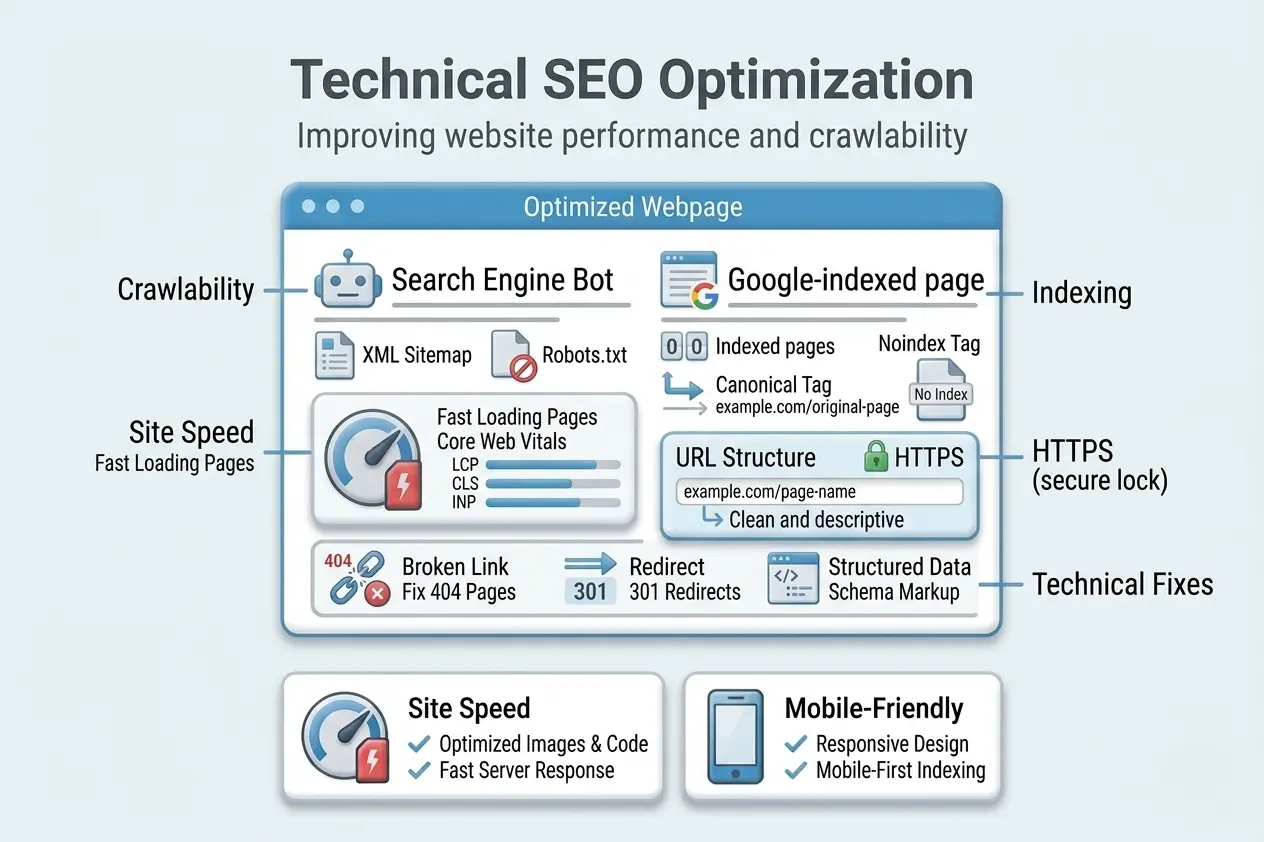
Technical SEO covers the behind-the-scenes work that helps search engines crawl, index, and understand your website efficiently. Even the best content will struggle to rank if your website has unresolved technical issues. Think of technical SEO as the foundation your content stands on.
2.1 Website Speed and Core Web Vitals
Page speed is a confirmed Google ranking factor. Slow websites frustrate users and get penalized in rankings. Google measures speed through a framework called Core Web Vitals.
|
Core Web Vital
|
What It Measures
|
Target Score
|
|---|---|---|
|
LCP (Largest Contentful Paint)
|
How fast the main content loads
|
Under 2.5 seconds
|
|
INP (Interaction to Next Paint)
|
How fast the page responds to user input
|
Under 200ms
|
|
CLS (Cumulative Layout Shift)
|
How stable the layout is while loading
|
Under 0.1
|
How to improve page speed:
- Use a fast, reliable hosting provider — speed starts at the server level
- Compress all images using tools like TinyPNG or ShortPixel
- Use a Content Delivery Network (CDN) like Cloudflare
- Enable browser caching and GZIP compression
- Minify CSS, JavaScript, and HTML files
- Remove unused plugins and third-party scripts
- Use Google PageSpeed Insights to diagnose specific issues on your pages
2.2 Mobile-First Indexing
Since 2019, Google uses the mobile version of your website for indexing and ranking — not the desktop version. This shift reflects the reality that over 60% of all Google searches now happen on mobile devices. If your website does not work well on phones, you are at a severe ranking disadvantage.
Mobile SEO Checklist
- Use a responsive design that adapts to all screen sizes
- Ensure buttons and links are large enough to tap with a finger
- Avoid intrusive pop-ups that block content on mobile
- Make sure text is readable without zooming
- Test your site with Google’s Mobile-Friendly Test tool
2.3 HTTPS and Site Security
HTTPS is a confirmed Google ranking signal since 2014. More importantly, HTTPS protects your users’ data — which builds trust. If your site shows ‘HTTP’ in the browser, visitors may see a ‘Not Secure’ warning, which destroys credibility.
- Install an SSL certificate (many hosting providers offer it free via Let’s Encrypt)
- Redirect all HTTP URLs to HTTPS using 301 redirects
- Update all internal links to use HTTPS versions
- Verify your HTTPS status in Google Search Console
2.4 XML Sitemap
An XML sitemap is a file that lists all important pages on your website. It tells Google exactly what you want crawled and indexed — and how frequently those pages are updated. Most CMS platforms like WordPress generate sitemaps automatically via plugins like Yoast SEO or Rank Math. Submit your sitemap via Google Search Console.
2.5 Robots.txt
A robots.txt file is a simple text file at the root of your website that tells search engine crawlers which pages to visit and which to avoid. Be extremely careful with this file — an incorrectly configured robots.txt can accidentally block your entire site from Google. This is one of the most common and costly mistakes beginners make.
2.6 Canonical Tags
Duplicate content is a major technical SEO problem. If the same or very similar content appears on multiple URLs, Google gets confused about which version to rank. A canonical tag tells Google which version is the ‘official’ one. This is especially important for e-commerce sites with product variations and filter pages.
2.7 Structured Data (Schema Markup)
Structured data is code you add to your pages that helps Google understand your content and display it as rich results in search. Rich results consistently earn higher click-through rates.
|
Schema Type
|
What It Enables
|
|---|---|
|
Article
|
Shows publish date and author information in results
|
|
FAQ
|
Shows expandable questions directly in the SERP
|
|
How-to
|
Shows step-by-step instructions in search results
|
|
Product
|
Shows price, availability, and customer reviews
|
|
Local Business
|
Shows address, hours, and phone in local results
|
2.8 Site Architecture
Site architecture refers to how your website is organized and how pages link to each other. A strong architecture ensures:
- Every important page is reachable within 3 clicks from the homepage
- Google’s crawl budget is spent on your most valuable pages
- Link authority flows efficiently from established pages to newer content
- Users can navigate easily and find exactly what they are looking for
The best practice for larger sites is a topic cluster (silo) structure:
- Create one comprehensive ‘pillar page’ for each main topic area
- Write supporting articles for subtopics related to each pillar
- Interlink pillar pages and cluster articles strategically
- This signals to Google that you have deep expertise across that entire topic area
Technical SEO Quick Wins
- Fix broken links (404 errors) — use Screaming Frog to find them
- Submit your sitemap to Google Search Console
- Install an SSL certificate if you do not have HTTPS
- Enable caching and image compression on your hosting provider
- Add structured data to your most important pages
Type 3: Off-Page SEO
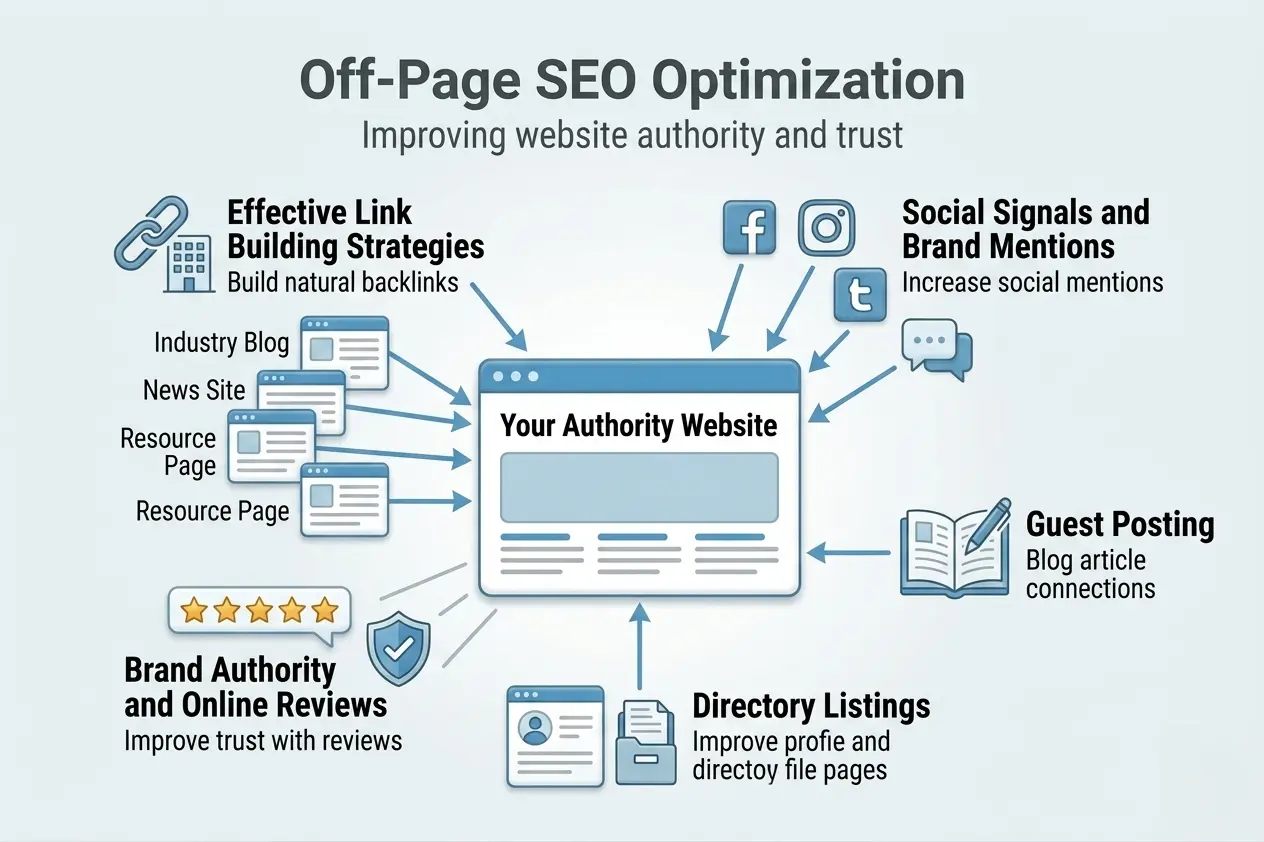
Off-Page SEO refers to everything you do outside your own website to improve your search rankings. It is primarily about building your website’s authority, credibility, and reputation across the web. Google evaluates your site’s reputation the same way people evaluate a professional’s reputation. The more trusted sources that vouch for you, the more credible you become.
3.1 Backlinks — The Currency of SEO
A backlink is a link from another website pointing to yours. Google treats each backlink as a ‘vote of confidence’. The more high-quality backlinks you earn, the more authority your site gains — but quality matters far more than quantity.
3.2 Effective Link Building Strategies
Guest Posting: Write high-quality articles for other websites in your industry. In return, you earn a backlink in your author bio or within the content. This is one of the most scalable link building strategies available.
The Skyscraper Technique: Find a highly-linked article in your niche, create a significantly better and more comprehensive version, then reach out to sites linking to the original and suggest your improved version.
Digital PR and Brand Mentions: Create original research, surveys, or infographics that journalists and bloggers will naturally cite. Tools like Help a Reporter Out (HARO) connect you directly with journalists seeking expert sources.
Broken Link Building: Find broken links on other websites using Ahrefs, then suggest your relevant content as a replacement. You are doing the website owner a favor while earning a backlink.
Resource Page Link Building: Find ‘useful links’ or resource pages in your niche and pitch your content as a worthy addition.
Testimonials and Partnerships: Write genuine testimonials for tools you use — many companies feature these with a link back to your site. Partnerships and sponsorships also often produce valuable backlinks.
3.3 Social Signals and Brand Mentions
While social media shares are not direct ranking factors, they create important indirect benefits:
- Social shares increase content visibility, leading to more natural backlinks
- Brand mentions (even without a link) build authority signals that Google recognizes
- Social profiles rank in branded searches, protecting your online reputation
- An active social presence drives traffic that creates positive user behavior signals
3.4 Brand Authority and Online Reviews
Google increasingly evaluates your brand’s overall online reputation through:
- Google Business reviews: Positive reviews directly impact both local SEO and general trust
- Third-party review sites (Trustpilot, Yelp): Signal legitimacy and build authority
- Wikipedia mentions: Being referenced on Wikipedia is a strong authority signal
- News coverage: Being cited in news articles significantly boosts E-E-A-T signals
Type 4: Local SEO
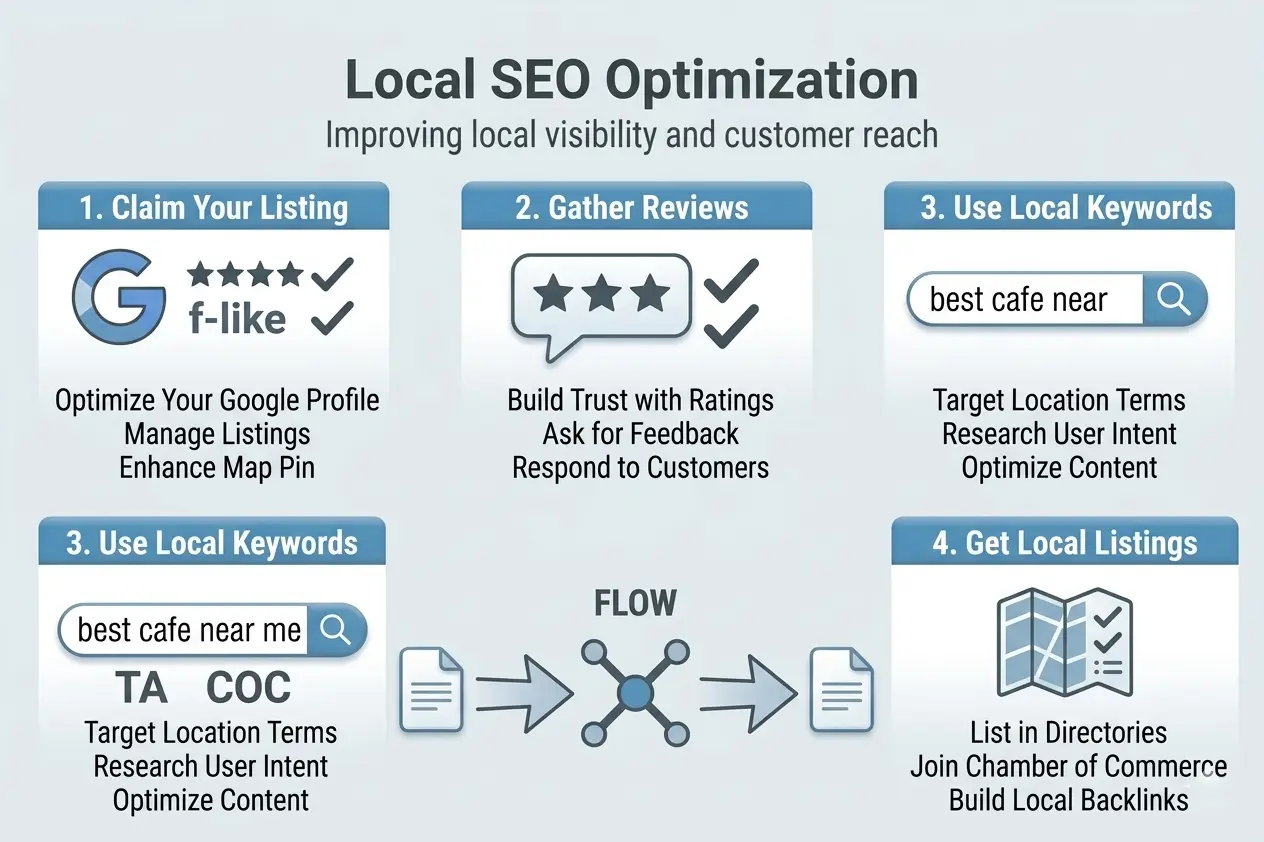
Local SEO is the practice of optimizing your online presence so that your business appears in search results for location-based queries. It is essential for any business that serves customers in a specific geographic area.
4.1 The Local Pack — The Most Valuable Real Estate in Local Search
When someone searches ‘dentist near me’ or ‘best restaurant in Thrissur,’ Google shows a special section called the Local Pack — a map with 3 business listings. These 3 spots attract a massive volume of clicks, often more than the top organic results. The Local Pack is powered primarily by your Google Business Profile.
4.2 Google Business Profile — Your Most Important Local SEO Asset
Google Business Profile (formerly Google My Business) is a free tool that controls how your business appears in Google Search and Google Maps. Fully optimizing your GBP is the single most impactful action you can take for local SEO.
How to fully optimize your Google Business Profile:
- Claim and verify your listing at business.google.com
- Choose the most accurate primary business category
- Fill in every field: name, address, phone, website, hours, and description
- Add high-quality photos of your exterior, interior, team, and products or services
- Post weekly updates, offers, and events using GBP Posts
- Respond professionally to every review — both positive and negative
- Enable messaging so customers can contact you directly from Google
- Add your products or services with descriptions and photos
- List any special attributes (women-led business, wheelchair accessible, etc.)
4.3 NAP Consistency — Name, Address, Phone
Google cross-references your NAP information across dozens of sources — directories, social profiles, review sites, and your own website. Inconsistencies in how your business name, address, or phone number appear across these sources confuse Google and hurt your local rankings.
NAP Consistency Rule
- Your business name, address, and phone number must be IDENTICAL everywhere online.
- Even small differences (Street vs. St., Suite vs. Ste.) create inconsistency signals.
- Review and update all listings whenever your business information changes.
4.4 Local Citations and Directory Listings
A local citation is any online mention of your business’s NAP information — even without a link. Google uses citations to validate that your business is real and located where you say it is.
Top directories to list your business:
- Google Business Profile (essential — your highest priority)
- Bing Places for Business
- Apple Maps Connect
- Facebook Business Page
- Yelp (especially important for restaurants and service businesses)
- Yellow Pages / Justdial (India)
- IndiaMART (for B2B businesses in India)
- Sulekha, Urban Company (for local services in India)
- Industry-specific directories relevant to your business type
- Use tools like Moz Local, BrightLocal, or Whitespark to audit and manage your citations across all directories.
4.5 Online Reviews — The #1 Local Ranking Factor
Reviews are the most powerful local SEO signal after your Google Business Profile. They influence both your rankings and your conversion rates, because potential customers read reviews before making decisions.
How to get more reviews ethically:
- Ask happy customers in person immediately after a positive experience
- Send a follow-up email with a direct link to your Google review page
- Add a ‘Leave Us a Review’ section to your website and email signature
- Train your team to request reviews as a natural part of customer interaction
- Never offer incentives for reviews — this violates Google’s policies and can result in removal.
4.6 Local Keyword Optimization
- Location pages: If you serve multiple areas, create a dedicated page for each (e.g., ‘SEO Services in Thrissur’, ‘SEO Services in Kochi’)
- Local landing pages: Optimize service pages with city and region names in the title, H1, body, and meta description
- ‘Near me’ optimization: Include phrases like ‘near me,’ ‘in [city],’ and ‘[service] + [location]’ in your content naturally
- Schema markup: Add LocalBusiness schema with your exact NAP, hours, and service area
- Embedded Google Map: Add a map to your Contact page — it reinforces location signals
4.7 Local Link Building
- Sponsor local events and earn a mention on the event website
- Join your local Chamber of Commerce — members are typically listed with links
- Partner with complementary local businesses for cross-promotion
- Get listed on local news websites and community blogs
- Donate to local charities or schools — many list their sponsors online
- Write for or be interviewed by local media outlets
4.8 Voice Search Optimization for Local
Voice searches have grown dramatically with smartphones and smart speakers. Voice queries are conversational, question-based, and heavily local — for example: ‘Hey Google, find the best biryani restaurant near me open now.’
Optimize for Voice Search
- Target question-based keywords (who, what, where, when, how)
- Create an FAQ page that answers the most common customer questions
- Keep your Google Business Profile updated with accurate hours
- Write content in a conversational tone that mirrors how people actually speak
- Aim to appear in featured snippets — voice assistants often read these aloud
4.9 Local SEO Tracking and Measurement
You cannot improve what you do not measure. Track these key local SEO metrics regularly:
- Google Business Profile Insights: Views, clicks, calls, direction requests, and photo views
- Local keyword rankings: Use BrightLocal or Whitespark to track rankings by location
- Organic traffic from local searches: Set up Google Analytics to monitor location-based traffic
- Review growth: Track the number and average rating of reviews over time
- Local pack appearances: Monitor how often your business appears in the Local Pack for target keywords
- Conversion tracking: Track calls, form submissions, and bookings attributed to local search
Local SEO Complete Checklist
- Google Business Profile fully optimized and verified
- NAP consistent across all directories and your website
- Listed on all major directories (Google, Bing, Apple, Facebook, Yelp, Justdial)
- 50+ Google reviews with a 4.0+ average rating
- Responding to every review, positive and negative
- LocalBusiness schema markup implemented on your website
- Location-specific pages created for each service area
- Local backlinks from community sites, directories, and industry publications
- Weekly GBP posts and photo uploads
- Performance tracked in GBP Insights and Google Analytics
4. SEO tools every beginner needs
You do not need expensive software to get started with SEO. The most powerful tools are either completely free or offer generous free plans that are more than enough for beginners. Here are the essential tools organised by what they do.
Google Search Console: The single most important SEO tool available. Shows which keywords you rank for, which pages get impressions and clicks, crawl errors, and indexing issues. Connect this on day one.
Google Analytics 4: Tracks your website traffic, user behaviour, bounce rate, and conversions. Tells you which pages people visit, how long they stay, and where they come from.
Google PageSpeed Insights: Tests your page speed and Core Web Vitals score. Shows exactly what is slowing your site down and gives specific recommendations to fix each issue.
Google Keyword Planner: Google’s own keyword research tool. Shows search volume and competition data for any keyword. Requires a Google Ads account to access — but you do not need to run ads.
Ubersuggest: Beginner-friendly keyword research and site audit tool. The free plan gives you keyword ideas, search volume, keyword difficulty scores, and basic backlink data.
Ahrefs Webmaster Tools: Free version of Ahrefs for your own website. Shows your backlink profile, which keywords you rank for, and site health issues. One of the most powerful free SEO tools available.
Screaming Frog: Crawls your website exactly like Googlebot does. Finds broken links, missing meta tags, duplicate content, and redirect issues. Free plan crawls up to 500 pages.
Yoast SEO / Rank Math: WordPress plugins that guide you through on-page SEO optimization as you write. Check title tags, meta descriptions, keyword usage, and readability in real time.
Conclusion: Your SEO Journey Starts Now
Every single day you wait, your competitors are climbing higher on Google and taking customers that could have been yours. SEO does not reward perfection — it rewards consistency. You do not need a big budget, a technical background, or years of experience to start. You need a clear strategy, the right actions, and the commitment to see it through. Everything in this guide has been proven on real websites with real results. The gap between where your website is today and where it could be in 12 months is not a mystery anymore — it is a decision. Make it now.
Muhammad Najash
Muhammad Najash is a Kannur-based SEO specialist and digital marketing professional with over a year of hands-on experience helping businesses grow their organic presence on Google. Trained at HACA (Haris & Co Academy), he built his expertise working directly on live websites and real rankings from day one — not just theory.
He specialises in on-page SEO, technical SEO, local SEO, keyword research, content strategy, and AI search optimization – working with clients across real estate, education, and e-commerce industries in Kerala and internationally.
Muhammad Najash holds verified certifications from Google (Analytics), HubSpot (SEO and AEO), SEMrush (Keyword Research), and Google Ads — each tested on real websites with real results. He also runs his own digital marketing practice in Kannur, delivering personalised SEO strategies built around each client’s specific business goals.
He can be reached on LinkedIn here.